Submitted Form visibility in Jobs / Scheduler
Title: Enhancing Visibility of Submitted Forms in Job Details
Summary: Introduce an improved method for visualizing the completion status of web forms directly within the job details list, utilizing a color-coded system to indicate form progress at a glance.
Details:
Current Challenge: Users currently lack a straightforward way to see if a web form associated with a job has been completed without manually checking each form or relying on tasks created upon form submission.
Proposed Solution: Enhance the job details section to include a color-coded "Form Progress" indicator. This feature would visually represent the status of forms linked to a job, with colors indicating:
Red: Not started
Orange: In progress
Green: Completed
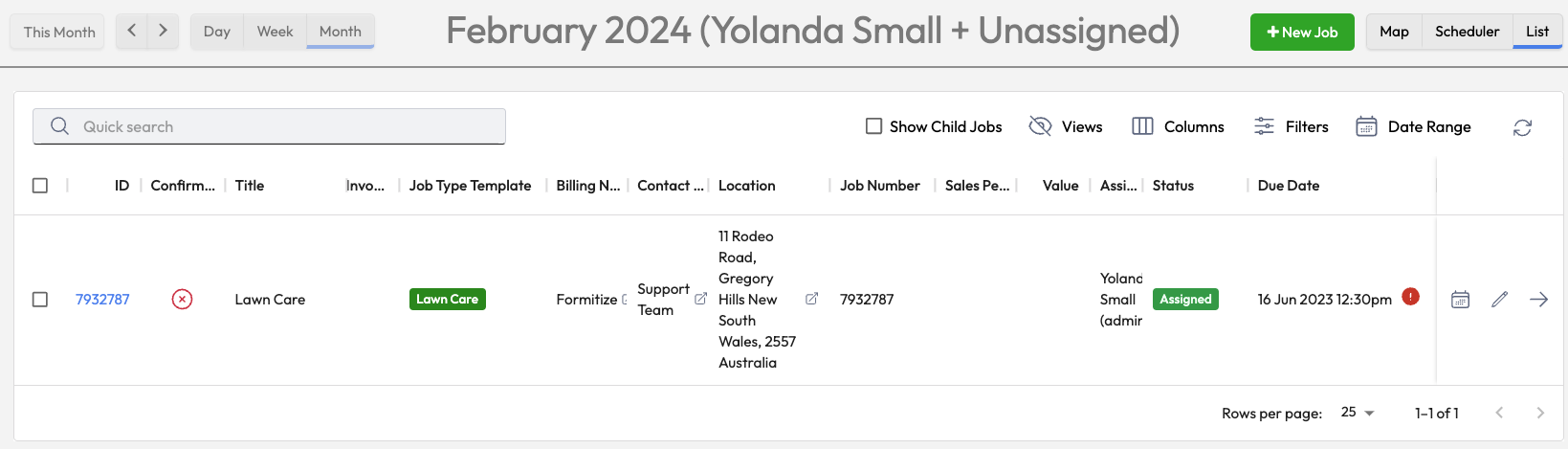
Implementation Area: Instead of integrating this feature within the Scheduler view, it is suggested that the form progress indicator be more effectively placed in the Job Details List, where users can quickly assess the status of forms related to specific jobs.
Benefits:
Increased Efficiency: Provides a quick, at-a-glance understanding of form completion status, reducing the need for manual checks.
Improved Workflow Management: Helps users prioritize actions based on the progress of form submissions associated with jobs.
Enhanced User Experience: Streamlines the process of monitoring form submissions, making the management of job-related documentation more intuitive.
IMAGE - Form completion indicator already available on the Job Details section:
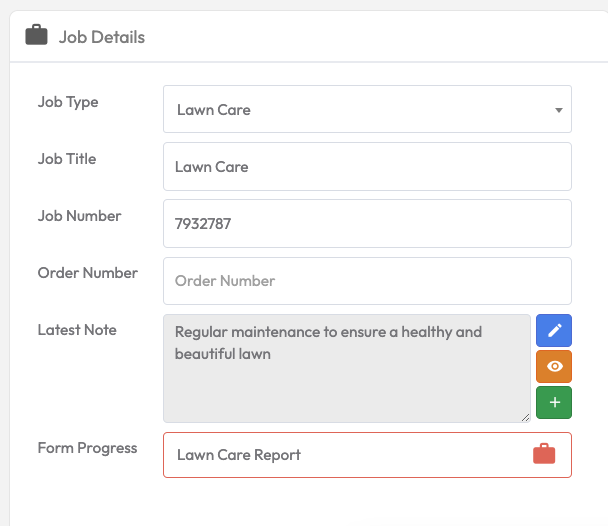
IMAGE - The form submission indicator could be brought into the Job List View: (Below)
Log in to comment and vote
Comments2
StanleyPDallas
Feb 19, 2025
Anything which can be done to improve the visability (at a glance) would be helpful. Having to click this and that to find status is killing us.
Keith Azzopardi
Feb 8, 2024
Assigned to Yolanda for initial validation/review